


 Contact Platform Support
 Help Center
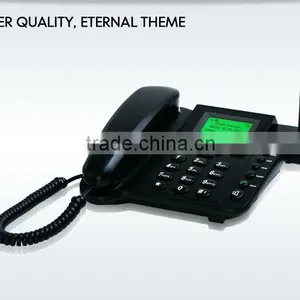
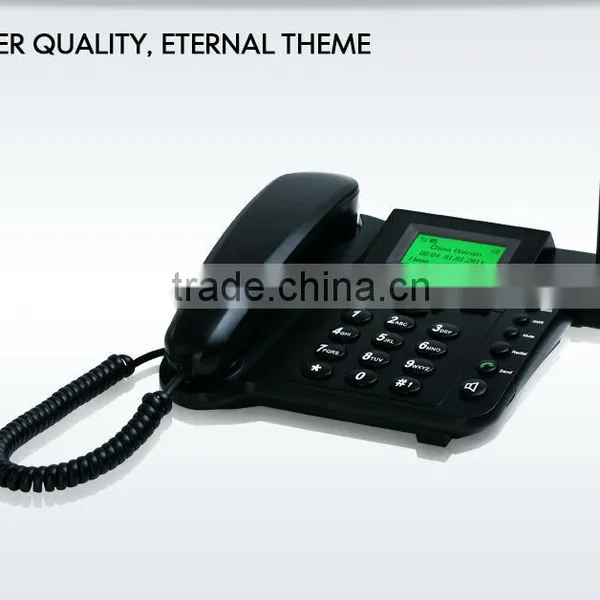
Telpo CDMA Fixed Wireless Phone, Wireless Phone, Land Phone G30


Related Products
-
 Telpo 3g Desktop Phone/ GSM Fixed Wireless Phone,sim Card Gsm Fixed Wireless Desktop Phone Quality ChoiceUS$ 1 - 30MOQ: 1 Piece
 -
Discount Dual Band Sim Card Fixed Wireless Gsm FwpUS$ 1 - 30MOQ: 1 Piece
-
Telpo G30 Fixed Wireless Phone/PayphoneUS$ 1 - 30MOQ: 1 Piece
-
Telpo G30 Fixed Wireless Phone Cheap ConvenientUS$ 1 - 30MOQ: 1 Piece
-
All-in-one Sim Card Fwp TelephonosUS$ 1 - 30MOQ: 1 Piece
Specifications
Telpo CDMA fixed wireless phone, wireless phone, land phone G301.Choice ring sounds
2.Two Way SMS, Voice Mail and caller ID
Telpo CDMA fixed wireless phone, wireless phone, land phone G30
Application:
1. Hotel
2. Home
3. Office
4. Store
5. Gas station
| Hardware/ Software |
Wireless Module | SIM800H/SIM5320 | |
| Memory | 32Mb Flash | ||
| Display | 2.8", 128*64 | ||
| Keypad | 12 alphanumeric keys, 14 function keys | ||
| Battery | Lithium Polymer rechargeable battery 3.7V Li-ion, 700mAH |
||
| Power Supply | Input:100-240VAC,60Hz/60Hz,1.0A;output:4.6VDC, 0.7A | ||
| Dimensions(mm) | 195(W)×185(L)×85(H) | ||
| Weight | 700g | ||
| Certification | CE | ||
| Mechnical | Frequency Band | Optional 2G GSM: 850/900/1800/1900MHz Optional3G WCDMA: 850/900/1800/1900MHz Dual-Band UMTS/HSDPA 850(800)/2100MHz Quad-Band GSM/GPRS/EDGE 850/900/1800/1900MHz |
|
| SIM Slots | Single SIM/Dual SIM | ||
| Communication | Voice and Data | ||
| Peripheral Ports | Data port | ||
| Buzzer single tone beeper | Yes | ||
| Digital Audiosynthesizer with built-in speaker | Yes | ||
| Handset | Yes | ||
| Micro Printer | Printer | Thermal graphic printer | |
| Speed | 18 lines/sec | ||
| Print paper width | 58mm | ||
| Application environment |
Working Environment: | Temperature:0°C~50°C; R.H.: 10%~90% (non-condensing) | |
| Storage Environment: | Temperature:-20°C~70°C; R.H.: 5%~95% (non-condensing) | ||
| Application | 1. Ticketing for bus, movie, and so on. 2. Lottery 3. Creat new SIM card 4. Personal information confirmed and unload to platform 5. Bill payment, loyalty card |
||
1) Trade Terms: FOB, FCA, EXW, CIF, CNF
2) Payment Terms: T/T, Western union, LC
3) Payment Condition: 30% deposit in advance, 70% balance before delivery
4) Delivery time: Sample-Within 2 to 3 days after payment
Batch order up to order quantity
5) Packing: Neutral Carton
6) Shipping: By sea, by air and by express delivery
7) We provide 1 year warranty for main device as well as 24 hours online service to help you out.
Q1. How to check the software version
A: Turn on the device, it will show the software version number on the screen during startup.
Q2. How to enter factory test mode
A: (1) For some old version, when the device is under standby state, click keys *#55#, it will enter factory test mode
(2) For new version, after press power on key, when the device is in startup, click the key “Cancel”.
It will show “Factory Mode”, then input keys *#55#, and click key “Menu”, then it will enter factory test mode.
In factory test mode, you can test lots of hardware function such as test printing, test keypad, test LCD, test GPRS connection, test SMS and so on.
Q3. Can not Turn On
A: Check the power adapter, or try to change another workable power adapter.
Check the battery, or try to change another normal battery.
Remove the battery, and only connect the power adapter. Or only use battery, and do not connect power adapter to test it. Then check the Power Supply Circuit and switch on/off the circuit according the test result.
If the circuit has no problem, and it still can not turn on, please try to discharge.
Q4. Can not detect the SIM CARD
A: Please check whether the SIM card is installed well.
Install the SIM CARD again.
Change another SIM card
Scrape the surface of the metal spring in the SIM CARD slot with knife.
Check whether all the weld point of the SIM CARD slot is welded well or not.. If not, please weld it again.
Replace the part of the SIM CARD slot.
Q5. Can not detect wireless signal
A: Please check whether it has GSM wireless signal in this place. If it has no GSM wireless signal or the signal is very weak, please try to test the terminal in another place with good GSM wireless signal.
Otherwise, please open the shell of the device, and check if the antenna is connected well.
Q6. Print unconventionality
A: If it can’t print, or has other print problem, please check the problem device according to following steps:
(1). Open the shell of the POS.
(2). Clean the printer header with ethanol.
(3). Check the connector cable
(4). Disconnect the cable, and clean the connector of the cable
(5). Reinstall, and test it again.
Q7. Print blurred
A: If it prints out blurry receipt, please do following steps.
(1). Clean the print header
Maybe it has some carbon accumulation on the print header.
(2). Check whether the print header installed well or not
Open the cover of the POS. Dismantle the print header.
There are two spring button on the print header.
Q8. Not feed paper
A: The POS does not feed paper during printing. But it can print out the receipt if you pull out the paper while printing.
(1). Check whether the paper installed well or not.
(2). Check the wheel of the roller
Check the wheel. If the gear wheel becomes bad or broken, please replace the roller.
(3). Check the wheel of the print header
Check the wheel. Is there anything block the wheel running? If yes, please clean it.
If the gear wheel becomes bad or broken, please replace print header.
(4). Test print without paper
Do not install paper, blot out the light sensor for pretending it from installing paper. Then try to print, check whether the wheel can run or not. If the wheel does not run, try to replace print PCB board, or try to replace the print head.
Q9. LCD screen problem
A: If the LCD screen shows abnormally, please check the problem according to following steps:
(1). Open the shell of the POS.
(2). Check the connector cable
Disconnect the LCD cable, and clean the connector surface of the LCD cable with absolute alcohol.
(3). Reinstall, and test it again.

Send Inquiry to This Supplier

You May Also Like
-
WIFI Converter for Wireless Data Transfer WF-01WIFI ConverterUS$ 1 - 10MOQ: 10 Pieces
-
Hot Sim Card Gsm Fixed Wireless Desktop PhoneUS$ 5 - 10MOQ: 1000 Pieces
-
Quad Band 850/900/1800/1900MHz GSM Wireless Fixed Terminal 3398 White ColorUS$ 62 - 70MOQ: 10 Pieces
-
NO.1workstation Telephone Call TerminationNegotiableMOQ: 1500 Sets
-
TVWSP High Performance Outdoor CPE,470~698MHzNegotiableMOQ: 1000 Pieces
-
FSK and DTMF Caller ID 850/900/1800/1900mhz Fixed Gsm TerminalUS$ 18 - 24MOQ: 1 Piece
-
Pneumatic Shielded Box for Wifi/5g/4g/signal TestUS$ 1350 - 1355MOQ: 1 Piece
-
World Smallest Mobile Sim Card Mini Gsm Voice Monitr Tracker With Microphone and Picture Video Capture Eavesdropping DeviceUS$ 12 - 13MOQ: 10 Pieces
-
30 Channel PCM Multiplexer-ZMUX-3030CUS$ 1 - 88MOQ: 1 Pair
-
C4U-40V4LPW5 Up to 40km 5Ghz WiFI PTP Link With 4 Phone LinesUS$ 2,700 - 2,710MOQ: 1 Piece


